Food businesses across Australia still rely on clipboards, but many are moving to apps. This guide compares digital food safety software with paper checklists so operators can choose what best protects customers, staff, and the business.
What is the real difference between digital tools and paper checklists?
The core difference is how records are captured, stored, and verified. Digital food safety software logs checks in real time with prompts, timestamps, and easier reporting, while paper relies on manual entries and physical filing.
In practice, digital systems reduce “missed step” risk, and paper systems depend heavily on staff consistency and supervisor follow-up.
Which option is easier for staff to use day to day?
Paper can feel simpler because it needs no device, login, or training. But digital food safety software often becomes easier after onboarding because it guides staff through required steps and reduces handwriting and double handling.
In busy Australian kitchens, staff usually prefer whatever is quickest during rush periods. Digital wins when it minimises steps, works offline, and is fast on a phone or tablet.
Which option reduces human error more reliably?
Digital typically reduces common errors by forcing completion, using drop-downs, and flagging unusual readings. Digital food safety software also time-stamps entries, helping managers spot checks that were completed late or filled in retrospectively.
Paper can be accurate, but it is easier to forget a check, misread handwriting, or record the wrong unit. These small issues can add up during audits or incident investigations.

How do both approaches handle temperature monitoring and corrective actions?
Digital systems can prompt at the right times and require a corrective action when a reading is out of range. With digital food safety software, the process can be: take a temperature, get an alert, record the fix, and notify a supervisor.
Paper can record the same information, but it relies on someone noticing the issue and remembering to document the response. In workplaces with casual staff turnover, digital prompts often improve consistency.
What happens during a food safety audit in Australia?
During a council or third-party audit, auditors want clear, complete, retrievable evidence. Digital food safety software can usually produce records quickly by date, site, or checklist type, which can shorten the “paper chase.”
Paper can still pass an audit, but the risk is missing pages, water damage, illegible notes, or inconsistent filing. If a business operates multiple sites in NSW, VIC, QLD, WA, SA, TAS, ACT, or the NT, paper coordination becomes harder.
Which option supports multi-site venues better?
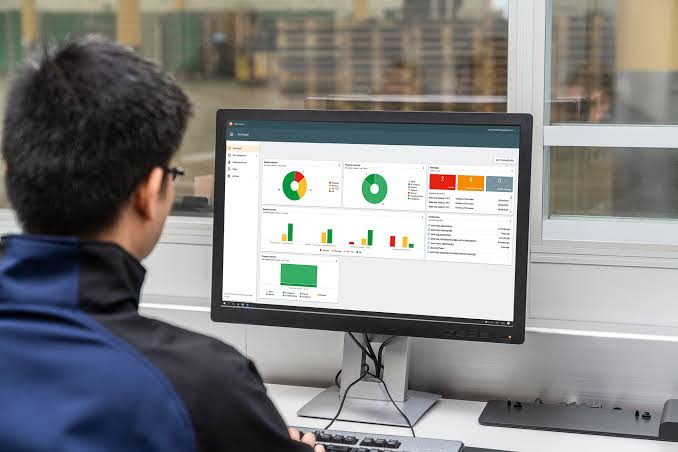
Multi-site operators usually benefit from central visibility. Digital food safety software allows head office to see compliance across venues, compare performance, and standardise forms without printing and distributing new templates.
Paper can work at one site with stable leadership. Across several sites, paper often becomes a patchwork of different versions and filing habits, making it harder to prove consistent systems.
How do they compare on traceability and incident response?
When a complaint or suspected foodborne illness occurs, time matters. Digital food safety software can help a business quickly pull temperature logs, cleaning records, and training sign-offs for the relevant period.
With paper, finding the right binder and the right week can take longer, especially if records are stored offsite or misplaced. Faster traceability can reduce downtime and help management respond confidently.
What are the costs beyond the subscription or stationery?
Paper looks cheaper upfront, but the hidden costs can be significant: printing, clipboards, storage, management time, and rework when forms are incomplete. Digital food safety software has a subscription cost, but may reduce admin hours and audit preparation time.
For Australian businesses paying penalty rates or managing lean teams, even small time savings can be meaningful. The real cost comparison is usually labour plus risk, not paper versus app alone.
Does digital create new risks like device issues or outages?
Yes, digital introduces operational dependencies: battery life, logins, device management, and occasional outages. Good digital food safety software mitigates this with offline mode, quick sync, role-based access, and simple device policies.
Paper avoids tech failures, but it has its own vulnerabilities like damaged forms, lost folders, and unauthorised edits. The best choice depends on which risks they can control more reliably.
How do both options affect accountability and food safety culture?
Digital systems can lift accountability by making responsibility visible. Digital food safety software can show who completed a task, when it happened, and whether it was overdue, which supports coaching rather than guesswork.
Paper can still build culture, especially with hands-on supervisors. But it can also create a “tick and flick” habit if staff treat it as paperwork for the sake of it, rather than a safety system.
Which option fits best with training, onboarding, and casual workforces?
High turnover is common in hospitality, aged care catering, and seasonal venues. Digital food safety software can embed instructions, photos, and short prompts inside tasks, reducing reliance on memory and informal training.
Paper checklists can be effective if they are well designed and supervisors consistently train staff. But paper rarely explains the “why” at the moment a task is done, which can matter for new starters.
What should they consider for different Australian industries?
Different settings have different pressures, and the best system is the one they will actually use every shift. Digital food safety software tends to suit higher complexity operations where evidence, speed, and oversight matter most.
- Cafes and restaurants: digital helps manage rush periods, temperature checks, and cleaning schedules with fewer missed tasks.
- Aged care and healthcare catering: digital supports stricter documentation and quick reporting.
- Childcare kitchens: digital can standardise routines and record compliance consistently.
- Retail and supermarkets: digital can support multi-department checks and traceability.
- Mobile food vans and events: paper can work, but digital is strong if it works offline and on phones.
Can they combine digital and paper without creating confusion?
A hybrid approach can work if roles are clear. Some businesses keep paper as a short-term backup while running digital food safety software as the primary record, especially during rollout.
The risk is duplication or mismatched “source of truth.” If they do both, they should define which record is authoritative, when paper is used, and how paper entries are later reconciled.
How should they decide which approach to adopt?
They should choose based on risk, complexity, and whether managers can actively verify compliance. If they need faster audits, multi-site visibility, and clearer accountability, digital food safety software is often the stronger option.
If they operate a single site with stable staff and disciplined supervision, paper can still be compliant. A practical decision process is to trial digital at one venue for 4 to 8 weeks, compare completion rates, and review audit readiness.
What does a fair side-by-side comparison look like?
A fair comparison focuses on outcomes rather than preference. Digital food safety software should be judged on ease of use, completion rates, corrective action tracking, reporting speed, and how well it fits the workflow.
Paper should be judged on form design, filing discipline, supervisor verification, and retrieval speed. If either system cannot produce complete records quickly, it is not truly working, regardless of how familiar it feels.
Conclusion: which one is better for Australian food businesses?
For many Australian operators, digital food safety software is better because it improves consistency, visibility, and record retrieval under real-world pressure. Paper checklists can still work, but they demand strong supervision and disciplined filing every day.
The best choice is the system they can sustain across busy shifts, staff changes, and audit requirements, while keeping food safety behaviours front and centre.
The core difference lies in how records are captured, stored, and verified. Digital food safety software logs checks in real time with prompts, timestamps, and easier reporting, reducing the risk of missed steps. In contrast, paper checklists rely on manual entries and physical filing, depending heavily on staff consistency and supervisor follow-up.
While paper may initially feel simpler as it requires no device or training, digital food safety software often becomes easier after onboarding because it guides staff through required steps, reduces handwriting, and minimizes double handling. In busy Australian kitchens, digital systems that work offline and are fast on phones or tablets tend to be preferred during rush periods.
Digital food safety software reduces common errors by enforcing task completion, using drop-down menus, flagging unusual readings, and timestamping entries to prevent late or retrospective filling. Paper checklists can be accurate but are more prone to forgotten checks, misread handwriting, or incorrect units, which can complicate audits or incident investigations.
Digital systems prompt staff at the right times to take temperatures, require corrective actions when readings are out of range, record fixes instantly, and notify supervisors—improving consistency especially with casual staff turnover. Paper can record similar information but relies on someone noticing issues and remembering to document responses manually.
Digital software provides quick retrieval of clear, complete records by date, site, or checklist type—shortening audit preparation time. It supports multi-site venues with central visibility for compliance tracking and standardizing forms without printing new templates. Paper records risk missing pages, damage, illegibility, inconsistent filing, and become harder to coordinate across multiple sites.
While paper appears cheaper upfront due to no subscription fees, hidden costs like printing, clipboards, storage space, management time, and rework for incomplete forms add up. Digital subscriptions may reduce administrative hours and audit prep time. For Australian businesses managing lean teams or paying penalty rates, labor savings plus reduced risk often make digital solutions more cost-effective overall.